Hash
Python은 dict 클래스로 구성된 Dictionary로 해시 자료구조를 제공한다. 해시는 다음과 같은 경우에 사용하면 좋다.
리스트 사용 X
리스트는 숫자 인덱스로 원소에 접근한다 (예: my_list[1])
숫자 인덱스가 아닌 다른 값 (문자열, 튜플 등)인 경우 dict 활용 (예: my_list[‘abc’])
빠른 접근/탐색이 필요
대부분 딕셔너리는 함수의 시간 복잡도: O(1)
Dictionary vs. List
Operation
Dictionary
List
Get Item
O(1)
O(1)
Insert Item
O(1)
O(1) ~ O(N)
Update Item
O(1)
O(1)
Delete Item
O(1)
O(1) ~ O(N)
Search Item
O(1)
O(N)
Dictionary의 탐색이 상수 시간 걸리는 이유
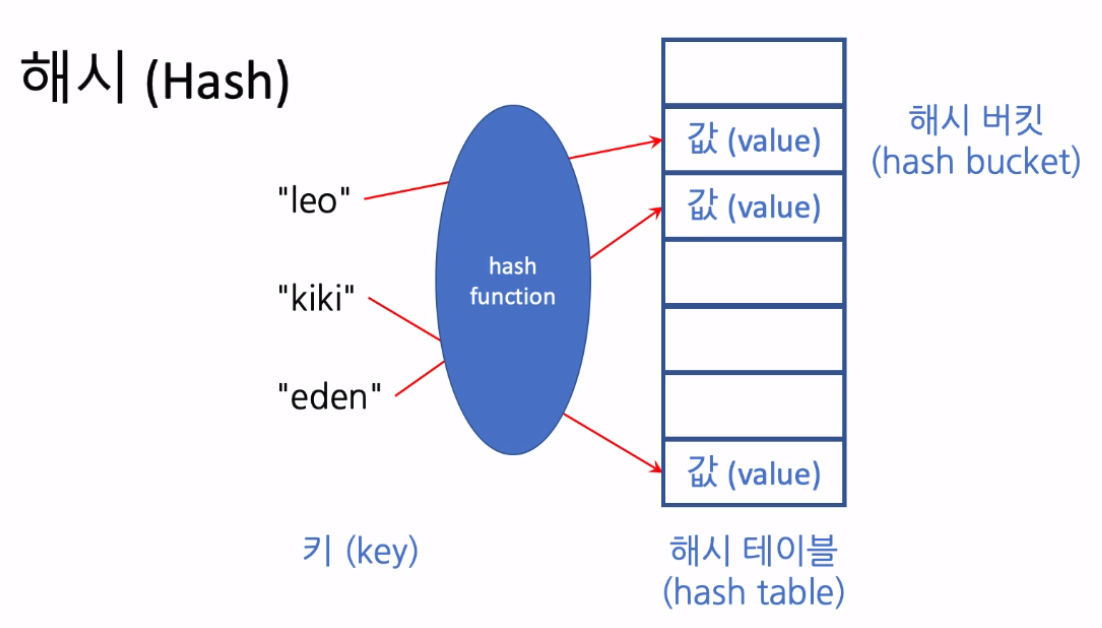
Key 값을 Hash function을 이용하여 산술 계산으로 값이 있는 위치를 바로 알 수 있음
만약 Hash function의 결과가 같은 경우 Collision이 생
집계
리스트의 각 원소 개수를 셀 때, collections 모듈의 Counter 클래스가 유용하다 (결과가 dict).
Dicitionary
Init
{} 기호, dict 함수로 빈 Dictionary를 선언할 수 있고, 특정 key-value 쌍을 가진 Dictionary를 선언할 수도 있다.
# {}, dict()
countries = {}
countries = dict()

# key-value 쌍 가진 Dictionary
countries = {
    'Korea': '한국',
    'USA': '미국'
}
countries = {
    'Korea': {
        'capital': 'Seoul',
    },
    'USA': {
        'capital': 'Washinton',
    },
}
Get
원소를 가져올 때에는 [] 기호를 사용하거나 get 메소드 사용한다. get 메소드는 get(x, 0)와 같은 형태로 사용하고, 딕셔너리에 key가 없는 경우 에러를 내지 않고 두 번째 값을 리턴한다. 실제로 집계 문제에서 get 메소드가 유용하게 사용될 수 있다.
my_dict = {'A': 300, 'B': 180}
my_dict.get('C', 0)
Delete
다음 2가지 방법으로 Dictionary의 key를 삭제할 수 있다.
del dict_obj[key]
del: 키워드
key X → keyError
>> my_dict = {'A': 300, 'B': 180}
>> del my_dict['A']
>> my_dict
{'B': 100}
>> del my_dict['C']
KeyError                                  Traceback (most recent call last)
<ipython-input-11-f31ea340fc5a> in <module>()
    1 my_dict = {'B': 180}
----> 2 del my_dict['C']

KeyError: '홍길동'
pop(key[, default])
pop: 메소드
key 값에 해당하는 value 리턴
key X → 두 번째 파라미터인 default 리턴 (default 설정 X → keyError)
>> my_dict = {'A': 300, 'B': 180}
>> my_dict.pop('A')
300
>> my_dict.pop('C', 100)
100
Iterate
for 문을 이용해 key만 순회하거나 key-value를 동시에 순회할 수 있다.
my_dict = {'A': 100, 'B': 200}

# key만 순회
for key in my_dict:
    print(key)

# key-value 동시 순회
for key, value in my_dict.items():
    print(key, value)
Others
특정 key 여부 조회: in
my_dict = {'김철수': 300, 'Anna': 180}
print("김철수" in my_dict)
print("김철수" not in my_dict)
key 또는 value → 시퀀스 (리스트나 튜플)
keys(), values(), items로 각각 key 리스트, value 리스트, (key, value) 리스트를 얻을 수 있다.
my_dict = {'A': 300, 'B': 180}

# keys
my_dict.keys()

# values
my_dict.values()

# items
my_dict.items()
집계를 위한 클래스: collections.Counter
Counter를 이용하면 리스트의 원소 수를 세기 용이하다.
import collections
my_list = ['A', 'B', 'C', 'D', 'D']
my_counter = collections.Counter(my_list)

# []로 원소 접근 가능
my_counter['A'] = 'Z'

# dict로 dictionary로 변경 가능
my_counter = dict(my_counter)
Dictionary vs. List
import timeit
import random

# '0'부터 '100000' 까지 문자열을 랜덤하게 담은 리스트
my_list = list(map(str, list(range(0,100000))))
random.shuffle(my_list)

my_dict = {i:True for i in my_list}

print('my_list: [{}, ...]'.format(','.join(my_list[:5])))
print('my_dict: {} ...}}'.format(str(my_dict)[:30]))

def search(container, value):
    return value in container

my_value = my_list[-1]
Dictionary
>> %timeit -n 5 search(my_list, my_value)
5 loops, best of 3: 10.1 ms per loop
Hash
>> %timeit -n 5 search(my_dict, my_value)
5 loops, best of 3: 266 ns per loop
defaultdict
dict를 이용하는 경우, 기존에 존재하지 않는 key를 사용할 때는 항상 초기화를 해줘야 한다. 이럴 때, 유용한 방법이 defaultdict를 활용하는 방법이다. defaultdict는 collections 모듈에 구현되어 있는 Dictionary로, 각 타입에 대한 default 값을 미리 지정해줄 수 있다.
dict 사용:
>> n_chars = {}
>> n_chars['a'] += 1
---------------------------------------------------------------------------
KeyError                                  Traceback (most recent call last)
<ipython-input-4-89f8752cb078> in <module>
    1 d = {}
----> 2 d['a'] += 1

KeyError: 'a'
defaultdict 사용:
>> from collections import defaultdict
>> n_chars = defaultdict(int)
>> n_chars['a'] += 1
>> n_chars
defaultdict(int, {'a': 1})